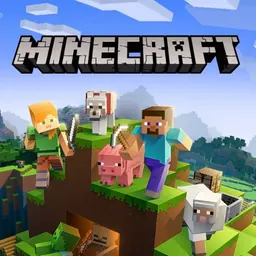
Minecraft Classic is the iconic early browser edition of the legendary 3D sandbox game, allowing players to build and explore freely within a retro block world. Featuring original terrain generation and classic 32-block creative building, this web version lets you construct houses, castles, sculptures, and sprawling landscapes block by block directly inside your web browser.
What makes Minecraft Classic so enjoyable is its pure creative freedom and instant accessibility. Without survival meters or complicated crafting recipes to worry about, you can focus entirely on your imagination and architectural ideas. It runs smoothly on school Chromebooks and laptops, making it a wonderful casual game to enjoy during study breaks or free time.
How to play Minecraft Classic
Minecraft Classic places you in a randomly generated 3D voxel sandbox with complete creative freedom. When you start a game, you spawn into an island world filled with grassy hills, sandy shores, water, and trees. Your goal is whatever you decide to make it, from digging massive underground caves to constructing towering monuments above the clouds.
Building in this version is instantaneous. You have access to 32 different block types, including colored wool, cobblestone, dirt, wood, saplings, and glass. You do not need to mine for hours to gather resources because every block in your inventory is unlimited. Simply select a block, point your crosshair at the world, and place it to start shaping the landscape.
If you make a mistake or want to clear terrain for a new project, you can break any block instantly with a single click. You can also explore different world sizes and generate brand new terrain whenever you want a fresh canvas for your creative builds.
Controls and keybindings
Minecraft Classic uses standard first-person computer controls that feel natural on any keyboard and mouse setup, including school Chromebooks.
Use the W, A, S, and D keys or arrow keys to move your character forward, left, backward, and right. Press the Spacebar to jump over obstacles or hop up hills. Use your mouse to look around and aim your crosshair at blocks in the environment.
Left-click with your mouse to mine or destroy blocks, and right-click to place the selected block. You can also press B to open the block selection menu and choose from the 32 available materials. Use the number keys 1 through 9 to switch between blocks in your active hotbar. Additional useful shortcuts include pressing R to respawn at your spawn point, pressing Enter to set a new spawn location, and pressing F to cycle through fog distances to optimize visual performance.
Tips for creative building
Planning your construction before placing blocks helps you create cleaner and more impressive builds. Start by flattening a section of ground using instant block breaking so you have a stable foundation for houses, towers, or fortresses.
Take advantage of the diverse colored wool blocks available in the building menu. Using different colored wools allows you to add vibrant artistic details, create pixel art sculptures, or decorate interior rooms with distinct accents.
Experiment with natural elements like water, trees, and glass windows to bring your structures to life. If you are building large bridges or tall structures, building temporary staircases or scaffoldings out of dirt helps you reach high vantage points safely.
Adjusting your render distance using the fog key can also keep the game running smoothly on lower-powered devices while you work on extensive construction projects.
Playing Minecraft Classic unblocked at school
Minecraft Classic is a fantastic game for students who want a relaxing creative outlet on school Chromebooks during free periods, lunch breaks, or club meetings. Because it runs directly inside modern web browsers using lightweight code, it requires no software installations or downloads.
School networks sometimes place filters on specific domains. To make sure you can always connect, this directory lists several working server options right below the game title. If one server button is filtered on your school connection, simply click another server button from the list above to start playing without interruption.
Games like Minecraft Classic
If you enjoy building, exploring, and crafting in sandbox worlds, there are several great titles on this site to try next.
Paper Minecraft delivers a fantastic 2D side-scrolling take on block survival and creative construction, complete with crafting recipes, mining, and mob encounters. Grindcraft provides an addictive clicker and crafting experience focused on resource progression and tool management inspired by block worlds.
For puzzle enthusiasts who love combining elements and discovering new items, Infinite Craft offers endless creative combinations. If you enjoy retro-style platforming and classic adventure mechanics, Super Mario provides timeless gameplay that runs great in any browser.
FAQ
Is Minecraft Classic unblocked free to play?
Yes, Minecraft Classic is completely free to play online in your browser. There are no fees, subscriptions, or account registrations required to start building.
Can I play Minecraft Classic on a school Chromebook?
Yes, Minecraft Classic runs smoothly on standard school Chromebooks and laptops because it operates entirely within any modern web browser without needing downloads.
How do you save your progress in Minecraft Classic?
You can save your current world level by opening the options menu and selecting the save function, or by generating a world link that remembers your block placements for your next session.
Who developed Minecraft Classic?
According to the catalogue information, this browser version is provided by Poki, bringing the beloved creative building sandbox directly to web players.
Why do students search for Minecraft Classic unblocked 66, 76, and 77?
Students frequently search for terms like Minecraft Classic unblocked 66, unblocked games 76, and unblocked games 77 when seeking accessible gaming mirrors on school networks. Our directory provides verified server buttons right above so you can play reliably without searching across multiple mirror websites.
What kind of blocks can you use in Minecraft Classic?
Minecraft Classic features 32 original block types, including grass, dirt, cobblestone, stone, wood planks, glass, sand, gravel, gold, iron, and a wide variety of colorful wool blocks for creative designs.