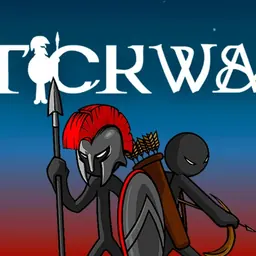
Stick War is a legendary real-time strategy game where you lead an army of stick figures in a battle for supremacy across the land of Inamorta. As the leader of the Order nation, your mission is to mine gold, assemble diverse military units, defend your base, and march forward to shatter the enemy statue.
What makes the game so engaging is its seamless blend of broad tactical management and direct combat control. You can manage overall army stances from a distance or jump into the boots of any individual soldier on the frontline to turn the tide of battle yourself during intense clashes.
How to play Stick War
The core objective in Stick War is simple yet demanding: protect your own statue while gathering enough resources to overwhelm and destroy the enemy monument on the opposite side of the battlefield. Every match begins with managing your economy by training miners to excavate gold from nearby deposits. Gold is the vital resource needed to train specialized combat units, upgrade your forces, and reinforce your defensive perimeter.
As your army grows, you must balance economic growth with active troop production. You can train basic melee fighters, deadly archers, shielded spearmen, powerful mages, and colossal giants as you advance through the campaign. Timing your offensive pushes is critical. If you attack too early without sufficient numbers, the opposing army will wipe out your vanguard and launch a devastating counterattack against your base.
Controls and manual combat mechanics
Stick War features straightforward controls that work smoothly on school Chromebooks and desktop web browsers. You use the mouse to click on icons at the top of the screen to train miners and warriors, as well as to switch between three strategic battle stances: defend, attack, and garrison inside your castle walls.
Beyond issuing broad commands, the game offers a unique manual control system. By clicking on any friendly unit on the field, you take direct control of that specific stick figure. When controlling a single unit, use the arrow keys or WASD keys to move across the battlefield, and use the mouse or spacebar to strike, shoot arrows, or raise your shield to block enemy projectiles. Taking direct control of archers or spearton units allows you to aim precision headshots and hold off superior enemy numbers with skilled timing.
Tips and strategies for victory
A strong economy is the foundation of every successful battle in Stick War. At the start of a match, focus on training two or three miners immediately so you have a steady stream of gold coming into your treasury. Never send combat units into battle alone while your gold reserves are empty, as you will be unable to replace losses if the initial skirmish goes poorly.
Learn to use the garrison command to protect your army from overwhelming enemy waves. When the opposing army charges toward your camp, ordering your troops to retreat behind the castle walls lets your base archers whittle down the attackers from absolute safety. Once the enemy wave breaks against your fortified walls, immediately order an all-out attack to catch them on the retreat.
Manual control can dramatically alter the outcome of tough campaign battles. Taking manual control of an archer unit enables you to outrange enemy units by angling shots from distance, picking off enemy miners or heavy infantry before they can close the distance to your frontline.
Playing Stick War unblocked at school
Stick War is an all-time favorite strategy title for students wanting an engaging tactical challenge during free periods, lunch breaks, or study sessions. Because certain network environments restrict access to individual gaming addresses, our directory offers multiple server options directly below the title header.
If a particular link is filtered on your school connection, simply switch to another server button provided above to continue playing. The game runs natively inside modern web browsers without requiring third-party plugins, downloads, or installation files, making it quick and easy to play on any standard school Chromebook.
Games like Stick War
If you enjoy the tactical army management and defensive gameplay of Stick War, several other great titles on this site offer similar excitement.
For another strategic test of base defense and resource management, Plants vs Zombies challenges you to deploy specialized units in tactical lanes to fend off waves of approaching enemies. If you prefer fast-paced action starring stick figures, Stickman Hook delivers satisfying physics-based swinging challenges, while Iron Snout tests your martial arts reflexes against endless waves of enemies. For players who love archery and precision combat, Narrow One provides intense competitive team battles in browser-friendly arenas.
FAQ
Is Stick War unblocked free to play?
Yes, Stick War is completely free to play directly in your web browser. You can enjoy the full single-player strategy campaign, unlock different unit types, and conquer opposing nations without any paid upgrades or subscriptions.
Can you play Stick War on a school Chromebook?
Yes, Stick War runs smoothly on school Chromebooks and laptops. The lightweight 2D graphics run efficiently in standard web browsers, delivering fast load times and responsive battle controls on basic school hardware.
How do you save your campaign progress in Stick War?
Your campaign milestones and unlocked technologies are automatically stored in your browser local storage. As long as you play on the same browser profile and avoid clearing your browser cache and cookies, your progress will remain saved for your next session.
Who developed Stick War?
Stick War is attributed to developer CrazyGames on popular web platforms, where the classic strategy title continues to be enjoyed by browser gaming fans worldwide.
Why do people search for Stick War unblocked 66, 76, and 77?
Search terms such as Stick War unblocked 66, Stick War unblocked 76, and Stick War unblocked 77 originate from students searching for working mirrors on sites like unblocked games 66 or unblocked games 76. Our page lists multiple direct server buttons at the top so you can launch a working game instantly without hunting through old mirror hubs.
Can you control individual stick units during combat?
Yes, one of the signature features of Stick War is manual unit control. You can click on any miner, warrior, archer, or spearton to control their movement, attacks, and defensive blocks directly using keyboard and mouse inputs.